Table of Contents
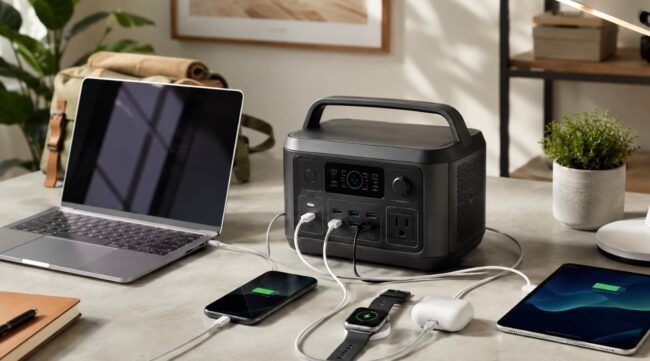
Portable power stations have become practical charging hubs for laptops, phones, tablets, cameras, routers and other smart devices, not just emergency gear for blackouts.
The best models in 2026 combine LiFePO4 batteries, high-output USB-C ports, fast AC charging and enough capacity to keep a mobile workspace running for hours.
For most laptop users, the real choice is between a compact 250–300Wh unit that is easy to carry and a 1kWh-class station that can support several devices at once.
These four current models stand out because their specifications match real portable-tech needs rather than oversized appliance loads.
The Best Portable Power Stations in 2026 at a Glance
No single portable power station is best for every setup. EcoFlow’s RIVER 3 Plus is the most travel-friendly option here, while the three 1kWh-class models provide far more reserve energy for a shared workspace or extended outage.
| Model | Capacity | AC output | Best fit |
| EcoFlow RIVER 3 Plus | 286Wh | 600W | Laptops and daily carry |
| Jackery Explorer 1000 v2 | 1,070Wh | 1,500W | Longer mobile work |
| BLUETTI Elite 100 V2 | 1,024Wh | 1,800W | Fast charging and mixed devices |
| DJI Power 1000 V2 | 1,024Wh | 2,600W | High-output tech and creators |
The capacity figure tells you how much energy is stored; AC output tells you how much power the station can deliver at one time. For phones and laptops, capacity and USB-C capability usually matter more than extreme inverter output.
A laptop-focused power station should be judged first by usable capacity and USB-C output, not by the largest AC wattage printed on the box. A 100W USB-C PD port can directly charge many ultrabooks and business laptops, while 140W USB-C is better suited to newer high-performance machines. Battery design matters too. Some rechargeable packs and electronics use the cylindrical 18650 battery format, named for its 18 mm by 65 mm dimensions, while the models selected here use LiFePO4 chemistry for their main storage batteries.
- Choose 250–300Wh for day trips and lighter laptop charging.
- Choose around 1kWh for multiple laptops, monitors, routers or longer outages.
- Prefer direct USB-C charging when possible to avoid AC conversion losses.
- Check cycle-life ratings if the station will be used every week.
EcoFlow RIVER 3 Plus Is the Best Compact Choice
The EcoFlow RIVER 3 Plus is the best fit here for users who actually want to carry a power station between home, a car and a temporary workspace. EcoFlow lists a 286Wh LiFePO4 battery, 600W AC output and a 100W USB-C port, enough for many laptops without using their wall chargers. The unit also supports a sub-10 ms UPS switchover and can recharge from AC in about one hour under the manufacturer’s specified conditions.
Practical advantage: a 286Wh station is large enough to support several mobile devices but still avoids the bulk of a 1kWh battery box.
Its main limitation is straightforward: 286Wh disappears much faster when a laptop, monitor and networking gear are all connected together. That makes it especially useful for commuters, hybrid workers and shorter off-grid work sessions.
Jackery Explorer 1000 v2 Offers the Best All-Round Balance
The Jackery Explorer 1000 v2 is the strongest all-round choice for users who need substantially more runtime without moving into a very large backup system. Its 1,070Wh LiFePO4 battery is paired with 1,500W rated AC output and a 3,000W surge rating. Jackery also lists one 100W USB-C port and one 30W USB-C port, so a laptop and smaller device can charge directly at the same time.
- The listed weight is 23.8 pounds, making it portable but clearly heavier than compact 300Wh units.
- Jackery rates the battery for 4,000 cycles to at least 70% remaining capacity.
For remote work, this balance is useful: enough capacity for long sessions, conventional AC outlets for chargers, and direct USB-C for modern notebooks.
BLUETTI Elite 100 V2 Excels at USB-C Charging
The BLUETTI Elite 100 V2 is particularly attractive when charging speed and port flexibility matter. BLUETTI specifies 1,024Wh of LiFePO4 storage, 1,800W AC output, one 140W USB-C port and a second 100W USB-C port. That combination can cover a power-hungry laptop and another USB-C device without immediately occupying an AC socket. The station weighs 25 pounds and supports up to 1,000W of solar input.
Did you know? BLUETTI rates the Elite 100 V2 for more than 4,000 cycles to 80% of original capacity and lists a UPS switching time of 10 ms or less.
This is a strong option for users who mix laptops, cameras, tablets and network equipment, especially when fast DC charging matters as much as raw battery size.
DJI Power 1000 V2 Is Built for High-Power Tech
The DJI Power 1000 V2 is the most powerful choice in this group for creators and users with higher-output equipment. DJI lists a 1,024Wh LFP battery and 2,600W maximum continuous output, but its laptop-friendly feature is the pair of 140W USB-C ports. Together they can provide up to 280W, allowing two compatible high-power USB-C devices to charge without AC adapters. DJI also states that the station can recharge fully from grid power in 56 minutes in fast-charging mode.
- Dual 140W USB-C ports support demanding laptops.
- Two USB-A ports handle older accessories.
- The station weighs 14.2 kg.
- DJI rates the battery for 4,000 cycles to 80% capacity.
For photographers and video crews, the broader DJI charging ecosystem is an additional advantage.
Match Battery Capacity to the Devices You Actually Use
Capacity should be matched to the devices you actually use. A 60Wh laptop battery does not mean a 286Wh station will deliver exactly 4.7 full charges, because energy is lost through the inverter, voltage conversion, cables and the station’s own electronics.
Direct USB-C typically reduces some conversion overhead compared with powering a laptop’s AC brick. If your mobile workstation includes accessories such as an ergonomic USB-C setup, phone, tablet and portable display, add their expected energy use before choosing a battery size.
For home backup, remember that networking gear and smart hubs may need power continuously. That matters if your smart-home automations depend on connected devices. A smaller station may be ideal for a laptop alone but undersized for a full connected desk.
Frequently Asked Questions
1. Can you take a portable power station on a plane?
Usually not if it exceeds 160Wh. The FAA PackSafe rules state that lithium-battery power stations and generators above 160Wh are forbidden on passenger aircraft, so all four models in this list exceed that limit.
2. Where should a power station be stored?
Keep it in a dry, ventilated place away from prolonged extreme heat or cold, and follow the manufacturer’s storage-charge instructions.
3. Can an old power station go in household recycling?
No. The EPA says used lithium-ion batteries and devices containing them should go to dedicated battery or hazardous-waste collection points, not household trash or curbside recycling.
4. Does a 140W USB-C port always charge a laptop at 140W?
No. The laptop, charging protocol and cable must all support that power level; otherwise charging falls back to a lower negotiated rate.
Which Portable Power Station Should You Buy in 2026?
For most laptop and smart-device users in 2026, the EcoFlow RIVER 3 Plus is the easiest compact choice, while the Jackery Explorer 1000 v2 offers a balanced jump to longer runtime. The BLUETTI Elite 100 V2 stands out for its 140W plus 100W USB-C combination, and the DJI Power 1000 V2 is the best match for high-output laptops, creator gear and multi-device charging.
Buy by workload, not by the biggest wattage number. A smaller station is easier to live with if your needs are modest, while a 1kWh-class model makes more sense when several devices must stay online through a long workday or outage.