
Table of Contents
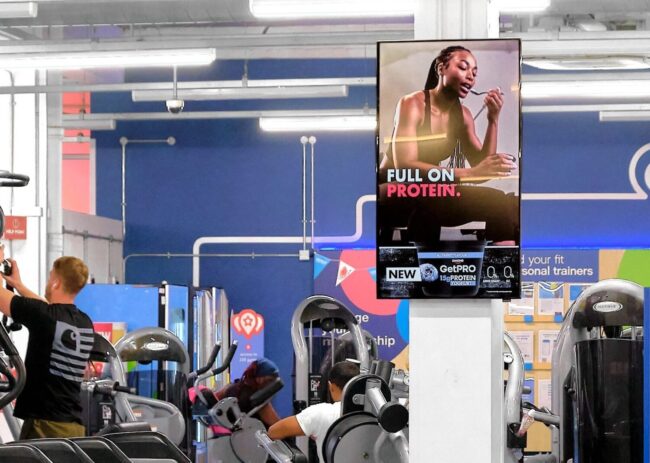
Walk into any modern gym and you’ll notice something right away. Screens are everywhere. They’re not just playing random music videos anymore. They’re carefully managed, dynamic, and surprisingly strategic.
Behind that polished experience sits a gym screen content management system, quietly organizing playlists, assigning stations, and controlling who can change what. If you’re running a fitness facility or building tech for one, understanding how these systems work can make a real difference in both operations and member experience.
Let’s get into it in a way that actually makes sense.
What a Gym Screen Content Management System Really Does
At its core, a gym screen content management system is a centralized platform that controls what appears on every display inside your facility. That includes class schedules, promotions, workout videos, and even internal staff updates.
These systems are typically cloud-based, which means updates happen in real time without someone manually adjusting each screen.
Here’s where it gets interesting. A well-configured system doesn’t just show content, it organizes it intelligently.
- It schedules content based on time, location, or audience
- It syncs messaging across multiple screens or locations
- It allows remote control from a single dashboard
- It ensures consistency without constant manual work
Gyms using digital signage this way often see better communication flow and stronger member engagement, especially when content stays fresh and relevant.

Where Booking Software Fits Into the Picture
Here’s something many gym owners don’t connect right away.
Your screen content system works best when it integrates with other tools, especially a platform like FitViz that works like booking software, you can automatically sync class schedules directly to your screens.
Instead of manually updating playlists every time a class changes, the system updates in real time.
That means:
- No outdated schedules on display
- Instant updates for cancellations or changes
- Better visibility of available spots
- Increased last-minute bookings
It’s a simple integration, but it removes a lot of daily friction.
How Playlists Keep Content Organized and Relevant
Think of playlists as the backbone of your screen strategy. Instead of randomly displaying content, playlists let you structure exactly what plays and when.
A playlist might include class schedules, motivational clips, promotions, and announcements, all arranged in a loop.
Why playlists matter more than you think
Without playlists, screens quickly turn chaotic or repetitive. With them, everything feels intentional.
Here’s how they typically work in a gym setup:
- Morning playlist shows class schedules, trainer intros, and light motivation
- Peak hours focus on high-energy visuals and upsell promotions
- Evening playlists highlight recovery tips, quieter messaging, or next-day schedules
Many systems even offer drag-and-drop playlist builders, making it easy to adjust content without technical skills.
That small shift can impact class attendance, upsells, and overall energy in the gym.

Stations – Controlling Content by Location
Now imagine showing the same content on every screen in your gym. That would feel… off.
This is where stations come in.
A station represents a specific screen or group of screens in a defined area. Each station can have its own playlist, tailored to the environment.
Typical station setup in a gym
Before diving into tools, it helps to visualize how stations are actually used:
- Front desk screens focus on promotions and welcome messages
- Training floor displays show workouts, timers, and motivation
- Studio entrances highlight class schedules and availability
- Locker rooms display announcements or internal updates
Different areas need different types of communication. A good system makes that segmentation simple.
Here’s a quick comparison to clarify the idea:
|
Area in Gym |
Content Type |
Purpose |
| Reception | Promotions, onboarding | First impression and sales |
| Workout floor | Videos, tips | Engagement and motivation |
| Studios | Schedules | Clarity and organization |
| Staff areas | Internal notes | Operations and coordination |
This level of control is what turns screens from decoration into a real operational tool.
Permissions – Who Gets to Control What
Here’s the part that often gets overlooked, but matters the most in real-world use.
Permissions define who can create, edit, approve, or publish content.
Without proper permissions, things can get messy fast.

Why permissions are critical
Imagine a trainer accidentally overwriting a global campaign, or a front desk employee publishing incomplete content. Not ideal.
Modern systems solve this with role-based access.
- Admins manage all screens and global content
- Managers control location-specific playlists
- Staff can upload or suggest content, but not publish it
- Marketing teams handle branding and campaigns
This structure keeps everything controlled while still allowing collaboration.
Cloud platforms make it even easier by allowing teams to edit and schedule content remotely while maintaining permission boundaries.
Real Benefits for Gym Operations and Member Experience
When playlists, stations, and permissions work together, the impact is noticeable.
Digital signage is no longer just informational. It becomes part of the gym experience.
What changes when everything is set up properly
- Members stay informed without asking staff
- Classes fill up faster due to better visibility
- Staff spend less time updating or explaining schedules
- Promotions reach the right audience at the right time
Gyms using digital screens as a communication hub often report higher engagement and smoother daily operations.
Making It Work Long-Term
Once everything is set up, the real value comes from consistency.
A gym screen content management system isn’t something you “set and forget.” It works best when it becomes part of your weekly workflow.
That doesn’t mean constant effort. Just small, regular updates.
- Refresh playlists weekly or bi-weekly
- Review station performance based on engagement
- Adjust permissions as your team evolves
- Integrate new tools when needed
Over time, the system becomes an extension of your brand, not just a technical add-on.
Final Thoughts
Gym screen content management systems might sound technical at first, but once you understand playlists, stations, and permissions, it all clicks.
It’s really about control. Control over what people see, where they see it, and who decides.
When done right, your screens stop being background noise and start becoming part of the experience. Members notice. Staff benefit. Operations run more smoothly.
And honestly, once you’ve seen a well-managed system in action, it’s hard to go back to static posters and manual updates.


